PSC Thulasi (also known as Kerala PSC Thulasi or KPSC Thulasi) is the official online recruitment portal operated by the Kerala Public Service Commission. The portal is accessed through the URL thulasi.psc.kerala.gov.in and serves as the single gateway for government job aspirants in Kerala.
Every year, lakhs of candidates use the PSC Thulasi login to apply for various government positions — from village office assistants and police constables to engineers and administrative officers. The portal handles everything from initial registration to final rank list publication, making it an essential tool for anyone pursuing a government career in Kerala.
The Kerala Public Service Commission was formed to manage state government recruitment through a transparent selection process, and the Thulasi One Time Registration system has made that process easier for candidates since 2012. Instead of submitting repeated paper forms, candidates can create one profile, keep their qualifications updated, apply for eligible posts, and return to thulasi.psc.kerala.gov.in whenever hall tickets, admission tickets, confirmation windows, ranked lists, or profile edits are available.
Kerala PSC records large candidate activity every year. Its 2023-24 annual report lists 9,17,816 applications for co-operative-sector recruitment alone and confirms service coverage across all 14 Kerala districts. That scale is why it is important to use the correct portal URL, keep your profile details accurate, and avoid unofficial login pages that ask for your User ID, password, or OTP.
If you've been searching for Kerala PSC login, keralapsc thulasi, KPSC Thulasi login, thulasi login, www keralapsc thulasi login, or kpsc thulasi login, this guide explains the practical steps in one place. Use it as a companion while opening thulasi.psc.kerala.gov.in in a separate tab.
Kerala PSC Thulasi Latest Notifications - June 2026
Short, practical updates for candidates who use PSC Thulasi for confirmation, hall tickets, notifications, interviews, and application tracking. Last checked: 3 June 2026.
What is PSC Thulasi? (thulasi.psc.kerala.gov.in)
The PSC Thulasi portal was launched by the Kerala Public Service Commission to digitize the entire recruitment process. Before Thulasi, candidates had to manually submit paper applications to various district offices — a process that was slow, error-prone, and expensive for candidates across the state.
Today, PSC Thulasi handles the following functions:
- One Time Registration (OTR) — A single registration process that creates your permanent candidate profile
- Exam Application — Apply for any KPSC notification with a single click after registration
- Hall Ticket Download — Download admit cards for scheduled examinations
- Result Checking — View exam results, shortlist status, and rank list positions
- Profile Management — Update personal details, qualifications, photo, and signature
- Exam Calendar View upcoming exam schedules and important dates
- Notification Tracking — Track the status of notifications you've applied to
Kerala PSC is the constitutional recruitment body for Kerala government departments and district offices. Across departments, it publishes hundreds of notifications in a typical year, including posts filled through written tests, interviews, physical tests, practical tests, and ranked lists. Candidates should therefore treat PSC Thulasi as the working account hub for notification tracking, application confirmation, admission tickets, results, and profile updates.
PSC Thulasi vs Old System - Why It's Better for Candidates
| Aspect | Old System | PSC Thulasi (Current) |
|---|---|---|
| Application | Paper forms at district offices | Online from anywhere |
| Registration | Separate for each exam | One Time Registration for all |
| Fee Payment | Cash at post offices | Online / Free for most |
| Hall Ticket | Postal delivery | Instant download |
| Results | Published in newspapers | Available on portal instantly |
| Profile Update | Visit district office | Online during editing windows |
| Processing Time | Weeks to months | Instant to few days |
Watch: How to Login to PSC Thulasi (Step-by-Step Video)
Follow this independent Malayalam walkthrough to understand PSC Thulasi registration and login navigation. Pause as you complete each step, never share your password or OTP, and remember that portal labels can change. Confirm current requirements and account instructions on the official Kerala PSC website before submitting personal information.
How to Login to PSC Thulasi Portal - Step-by-Step 2026
Follow these detailed steps to access your PSC Thulasi login account. This process works on all devices — desktop computers, laptops, tablets, and mobile phones. Make sure you have a stable internet connection before starting.
Open Your Web Browser
Launch any modern web browser — Google Chrome, Mozilla Firefox, Microsoft Edge, or Safari. Chrome is recommended for the best compatibility with the Thulasi portal. Make sure your browser is updated to the latest version.
Visit the Official Thulasi Website
Type thulasi.psc.kerala.gov.in in the address bar and press Enter. Make sure you're on the official KPSC website — look for the government seal and 'Kerala Public Service Commission' branding. Never use third-party links or search result ads to access the portal.
Locate the Login Section
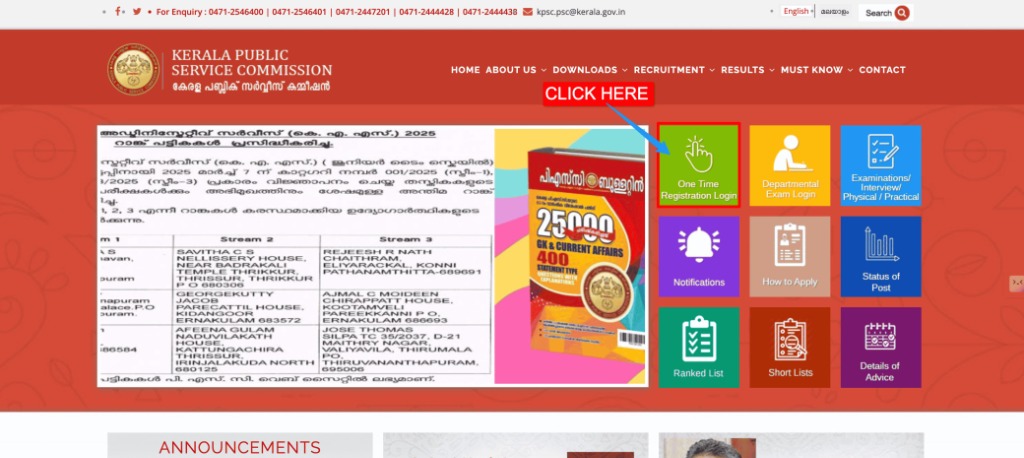
On the Thulasi homepage, you'll find the login options on the right side of the page. Look for the "One Time Registration Login" tile as shown below. Click on it to access the login form with fields for User ID, Password, and Captcha. If you're on mobile, scroll down slightly to find the login area.
Enter Your User ID
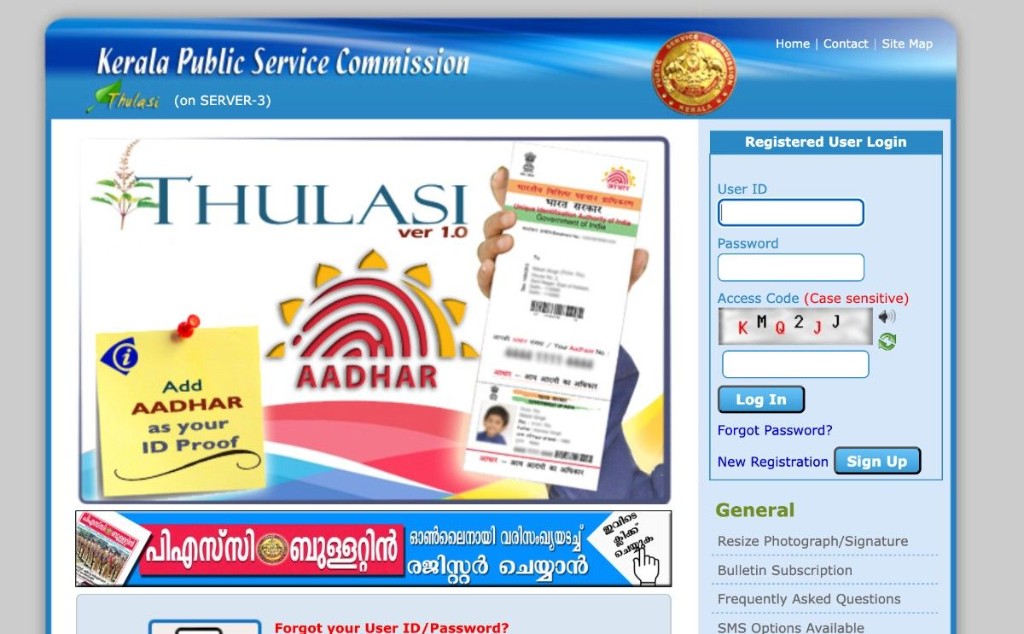
Type your registered User ID in the first field. This is the unique ID you created during your One Time Registration. The User ID is case-sensitive, so type it exactly as you set it.
Enter Your Password
Type your password in the second field. Be careful with uppercase and lowercase letters. If you're unsure, use the 'Show Password' toggle (eye icon) to verify before submitting.
Enter the Captcha Code
Look at the captcha image displayed below the password field. Type the characters exactly as shown — this includes both letters and numbers. If the captcha is blurry, click the refresh button to generate a new one.
Click the 'Login' Button
After filling all three fields correctly, click the 'Login' button. You'll be redirected to your PSC Thulasi dashboard within a few seconds. If there's an error, check your credentials and try again.
What You Can Do After PSC Thulasi Login
Your PSC Thulasi dashboard is the control center for your entire KPSC recruitment journey. Here's every feature available after logging in:
PSC Thulasi Login Requirements
Before you attempt to login, make sure you have the following:
| Requirement | Details |
|---|---|
| Registered User ID | The unique ID created during One Time Registration (OTR) |
| Password | Your current password (minimum 8 characters, letters and numbers) |
| Internet Connection | Stable broadband or mobile data (minimum 1 Mbps recommended) |
| Web Browser | Chrome (v90+), Firefox (v88+), Edge (v90+), or Safari (v14+) |
| JavaScript Enabled | Must be enabled in browser settings |
| Cookies Enabled | Browser cookies must be enabled for session management |
| OTR Completed | You must have completed One Time Registration before login |
PSC Thulasi Login Not Working - Fix All Problems 2026
Many candidates face issues while trying to login, especially during peak notification periods. Here's a comprehensive troubleshooting guide:
1. Forgot Password
The most common login issue. To reset your password:
- Click "Forgot Password" on the login page
- Enter your registered User ID
- Choose recovery method Email OTP or Mobile OTP
- Enter the OTP received on your registered email/mobile
- Create a new password (min 8 characters, include letters + numbers)
- Login with your new password
2. Forgot User ID
If you can't remember your User ID:
- Check your email inbox for the original registration confirmation from KPSC
- Look for screenshots or notes saved during registration
- Contact KPSC helpdesk with your registered email and phone number
3. Captcha Not Loading
- Click the captcha refresh button to load a new image
- Clear your browser cache and cookies completely
- Try incognito/private browsing mode
- Switch to a different browser
- Disable ad blockers or browser extensions temporarily
- Check if JavaScript is enabled
4. Server Down or Very Slow
During major notifications, the server gets heavy traffic. Best times to login:
| Time Slot | Server Load | Recommendation |
|---|---|---|
| 6:00 AM – 8:00 AM | Low 🟢 | Best time — servers least loaded |
| 8:00 AM – 12:00 PM | Very High 🔴 | Avoid if possible — peak traffic |
| 12:00 PM – 2:00 PM | High | Moderate traffic — may work with patience |
| 2:00 PM – 5:00 PM | Medium 🟡 | Generally accessible |
| 5:00 PM – 8:00 PM | High 🟡 | Evening rush — second peak |
| 8:00 PM – 12:00 AM | Low 🟢 | Good time — servers relatively free |
| 12:00 AM – 6:00 AM | Very Low 🟢 | Fastest speeds |
5. Account Locked
- Wait at least 30 minutes before trying again
- Verify you're entering the correct password
- If still locked, use the PSC Thulasi Password Reset Guide
- Contact KPSC helpdesk if the issue persists
6. "Invalid User ID or Password" Error
- Check if Caps Lock is turned on
- Look for extra spaces before or after User ID
- Make sure you're not using an old password
- Don't confuse letter "O" with "0" or "l" with "1"
Tips for a Smooth PSC Thulasi Login
Important KPSC Information
| Feature | Details |
|---|---|
| Official Portal | thulasi.psc.kerala.gov.in |
| Registration Type | One Time Registration (OTR) |
| Application Fee | Free for most categories |
| Age Limit | Varies — generally 18 to 36 years (relaxation for reserved) |
| Exam Types | OMR-based, Computer-based, Interview, Physical Test |
| Rank List Validity | Usually 1 year (extendable) |
| District Offices | 14 across Kerala for document verification |
| Helpdesk | 0471-2546400 / 0471-2546401 |